
Back to blog
What Makes an AI Website Builder Effective? [Explained]
Discover what makes an AI website builder effective and learn how to choose a platform that helps you create, customize, and launch your site faster.

Mar 10 2026
![What Makes an AI Website Builder Effective? [Explained]](https://codesi.ai/admin/static/cov07_54bbe9d256.webp)
What makes an AI website builder effective is a question many people only think to ask after picking the wrong one.
You sign up, run the generation, and end up with a layout that needs new copy, better images, a logo from somewhere else, and a hosting plan you still have to configure. At that point, the builder saved you a template choice and not much else.
The features that define an effective AI builder go beyond generation speed. They cover the quality of what gets produced, how much control you retain after the AI has done its part, and whether the platform handles everything in one place or quietly offloads the hard work back to you.
This guide breaks down each one so you know what to look for before you commit.
7 Features That Make an AI Website Builder Effective
Not every platform that calls itself an AI website builder earns the label.
Some generate a starter layout and hand the rest back to you. Others handle the entire process, resulting in a publish-ready site.
The difference comes down to a handful of specific capabilities and how well each one is executed.
1. Time from Prompt to Publish
The pitch most AI builders lead with is speed, and the best ones deliver on it in ways that actually shorten the time from idea to live site. A strong builder should take a short business description and return something close to a finished site, not a wireframe you need to spend hours filling in.
The real test is how much work remains after generation. If you're still sourcing images, writing all the copy, and configuring hosting separately, the AI handled one step in a process that still takes days. Effective builders compress the majority of the process into a single step.
What this looks like in practice:
- Site structure, layout, and sections generated automatically from a text prompt
- Copy drafted and placed within the layout, not left blank for you to fill in
- Images sourced or generated to match the site's category and tone
- Hosting configured without a separate setup
2. Smart Content and Design Generation
Generic output is the most common reason people abandon AI builders after the first attempt.
A layout appears, but the copy reads like it was written for no business in particular, the images look pulled from the same stock library every other site uses, and nothing feels specific to what you actually do. The generation happened, but the result still needs to be rebuilt from scratch.
Effective builders produce content that reflects the actual business. Copy that speaks to a specific audience, images that match the category and tone of the site, and design choices that feel considered rather than random.
Across every section, the output should feel like it was made for your business, not assembled from a template library with your name swapped in.
What this looks like in practice:
- Copy is written around your business description, not generic filler.
- Images are generated or sourced to match your site's category and tone.
- Color choices and typography create a consistent visual identity.
- Section layout and hierarchy guide the reader naturally through the page.
3. No-Code Functionality
A significant portion of small businesses cite complexity as the reason they haven't yet built a website. Effective AI builders remove that barrier entirely, not just at setup but throughout the life of the site. Every action, from adjusting a layout to swapping a section, should be manageable without touching code.
The no-code experience needs to hold after the initial generation. A builder that removes technical friction upfront but reintroduces it every time you want to make a change hasn't actually solved the problem.
What this looks like in practice:
- Drag-and-drop editing doesn't require HTML or CSS at any stage.
- Mobile responsiveness is handled automatically without manual adjustment.
- Publishing and domain connection are managed through the platform interface.
4. Customization After Generation
Generation handles the heavy work, but the ability to refine the result is what makes a site usable for a real business. Effective builders give you genuine control over layout, copy, colors, and sections after generation without requiring you to rebuild from scratch.
The editor should feel like a natural extension of the generation, not a separate tool you switch to once the AI is done.
What this looks like in practice:
- Real-time editing of text, colors, and sections without page reloads
- Ability to rearrange, add, or remove sections without affecting the rest of the site
- Changes that are visible immediately, allowing you to make decisions based on what you actually see
5. Built-in SEO and Mobile Optimization
A site that looks good but doesn't load well on mobile or show up in search results isn't doing its job. Effective builders implement SEO best practices and responsive design automatically, so neither becomes a separate task you have to return to after publishing.
What this looks like in practice:
- Meta titles, descriptions, and heading structure are set during generation.
- Mobile-responsive layouts are applied automatically across all sections.
- Page speed is optimized through clean code and properly compressed assets.
- Sitemap is generated and ready for indexing without manual configuration.
6. Brand Asset Creation
Most builders generate a site and leave branding to you. That means sourcing a logo separately, finding images that match your color palette, and hoping everything looks consistent when you piece it together.
Effective builders handle brand assets alongside the site, so the logo, images, and color scheme are a part of the same generation process.
What this looks like in practice:
- Logo variations are automatically generated and ready to use.
- Custom images are created to match the site's category, tone, and color palette.
- Brand colors are applied consistently across all sections from the start.
7. All-in-One Infrastructure
A builder that generates a great site but requires separate subscriptions for hosting, SSL, analytics, and a custom domain has only solved part of the problem. Effective builders bundle the infrastructure so there's nothing left to configure before you publish.
What this looks like in practice:
- Hosting and SSL are included in the subscription, with no third-party setup required.
- Custom domain connection is handled within the platform.
- Analytics is integrated directly, so you can track performance from the same dashboard.
The Balance Between Automation and Control
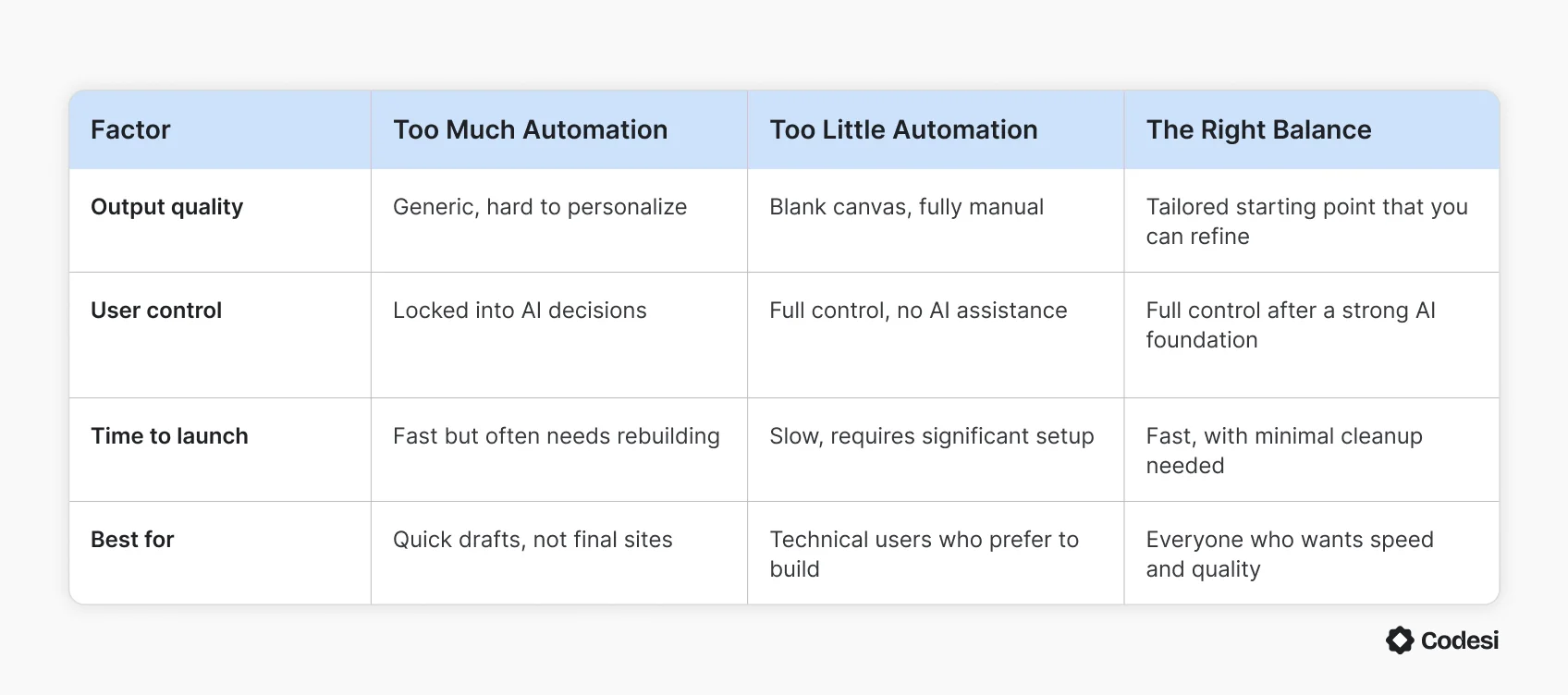
The main question when using an AI builder is how much the platform does versus how much it leaves to you. Too much automation, and the output feels generic, with little room to make it your own. Too little and the AI becomes a glorified template selector that still expects you to do the real work.
The most effective builders offer a middle ground, where the AI handles everything that slows people down at the start, and the editor handles everything that makes the result specific to your business.
The table below compares them side-by-side:
Common Mistakes to Avoid When Choosing an AI Website Builder
Users who end up with the wrong platform didn't make an obvious mistake—they made a reasonable decision based on incomplete information. These are the patterns that come up most often:
- Choosing based on the demo: Showcase sites are built to impress, not to represent what the AI produces for an average prompt. Always test the builder with your actual business description before committing to a plan.
- Prioritizing price over output quality: The cheapest option rarely produces the most usable result. A builder that generates a site you spend three hours fixing isn't saving you money; it's moving the cost from your wallet to your schedule.
- Overlooking renewal pricing: Introductory rates look attractive until the second billing cycle. A platform that costs $5 a month for the first year and $18 a month after that is a different value proposition than it appears at signup.
- Mistaking features for functionality: A long feature list doesn't mean those features work well together. SEO tools that require manual configuration, mobile optimization that needs adjustment, and analytics that live on a separate dashboard all technically count as features.
- Not accounting for what isn't included: Hosting, SSL, a custom domain, and brand assets are often sold separately. The platform fee is rarely the full cost, and the gap between what's included and what's extra varies significantly across builders.
What Makes Codesi an Effective AI Website Builder
Every feature in this guide is only effective if it holds up when you use it. A builder that nails four out of seven and falls short on the rest will still slow you down. Codesi is built around all of them.
Codesi doesn't ask you to make design decisions before your site exists. It asks you to describe your business in plain language, and the platform builds from there, handling everything from structure and copy to brand assets and hosting in a single process.
The result isn't a starting point that needs hours of work. It's a finished, coherent site you refine rather than rebuild.
Here's exactly how it works after you sign up:
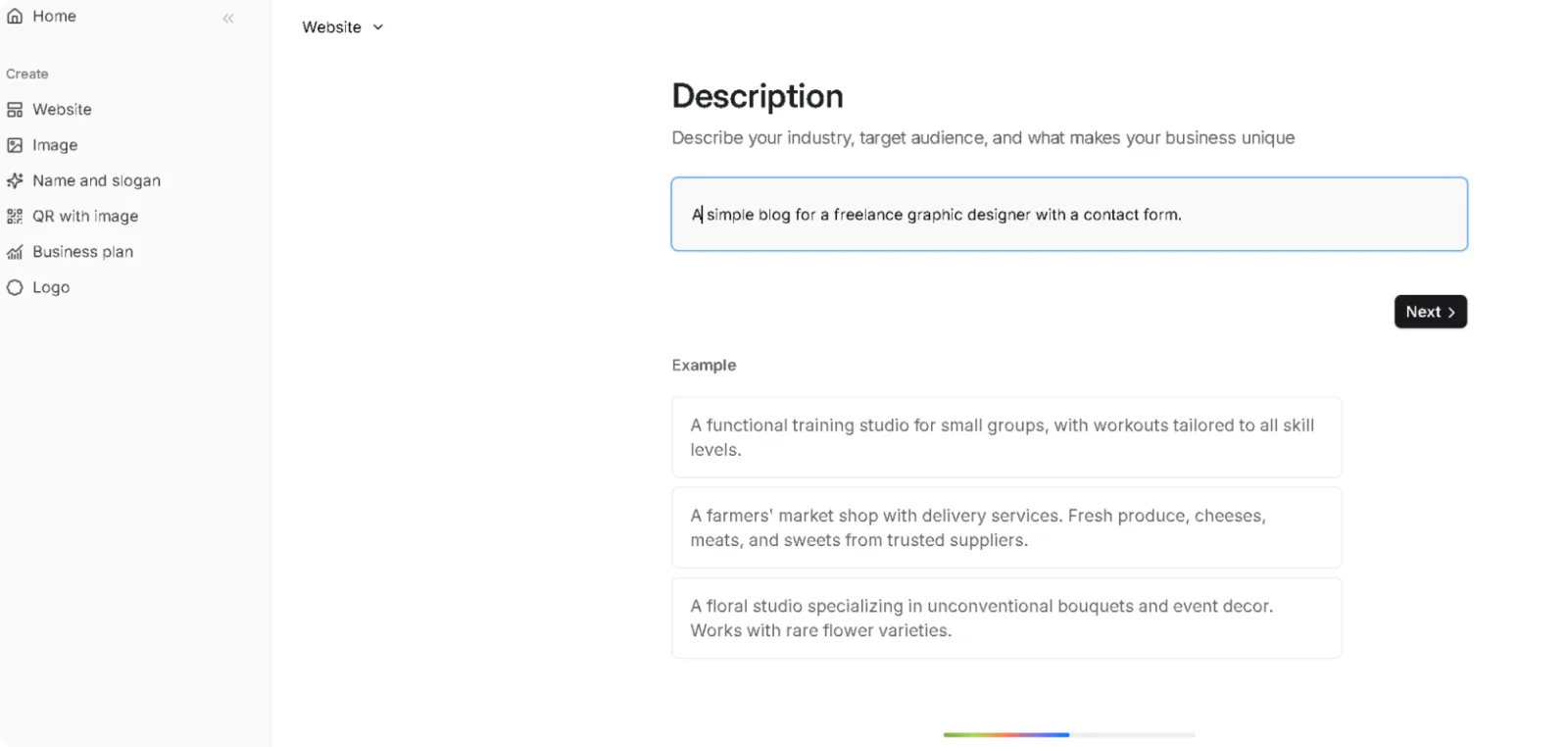
- Describe your business: You type a short description of what your business does, who it serves, and what you want visitors to do.
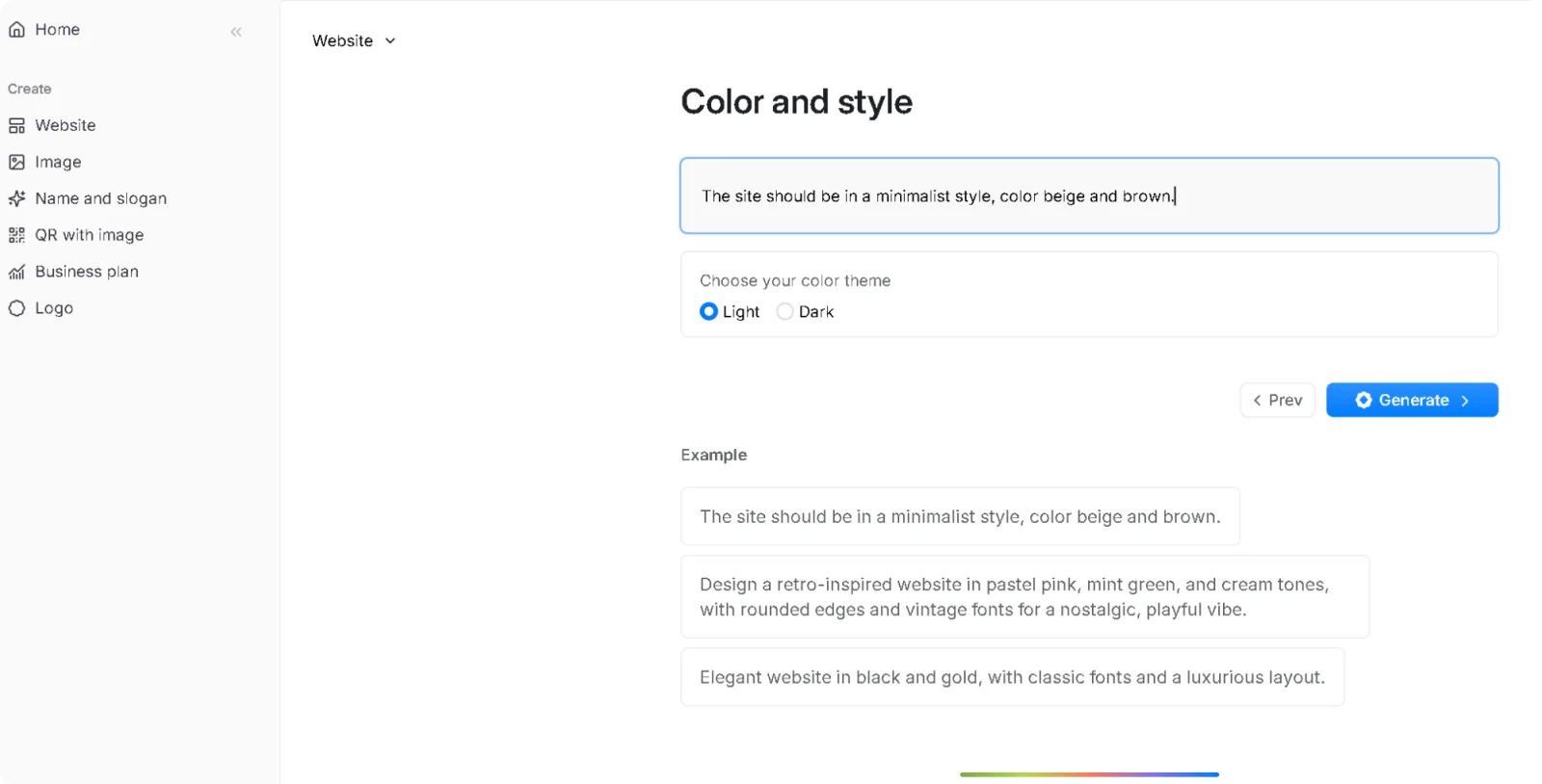
- Select your style and color palette: Before Codesi generates your site, choose the visual direction that fits your brand.
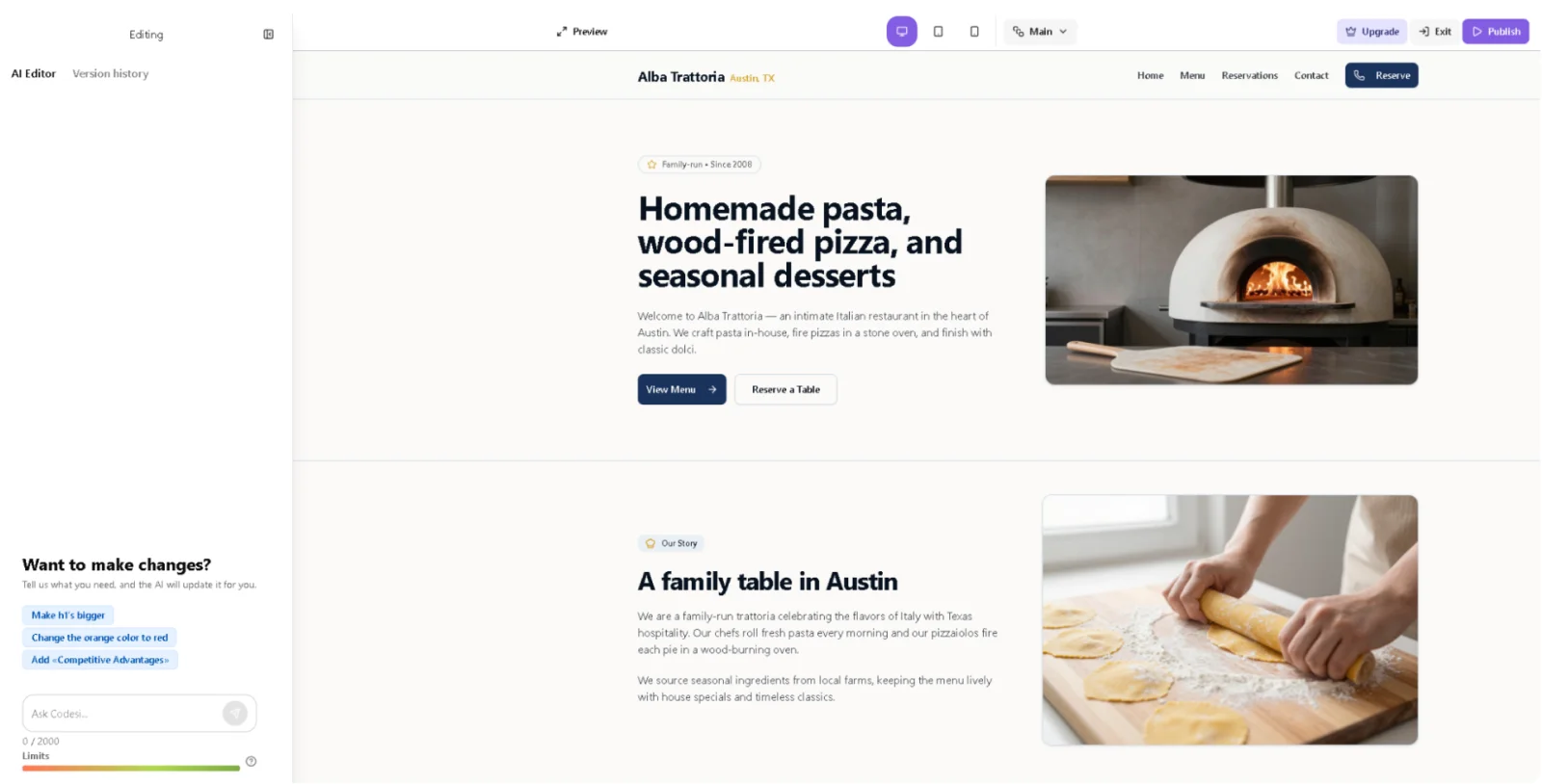
- Wait for Codesi to generate your site: In under two minutes, Codesi produces a complete one-page site with a layout, copy written around your description, custom AI images, and logo variations, all visually consistent from the start.
- Refine in the visual editor: The editor lets you adjust text, swap sections, change colors, and rearrange content in real time. Every change is visible immediately, and nothing requires code at any stage.
- Publish when satisfied: Your site deploys to a Codesi subdomain or your custom domain with a single click. Hosting and SSL are included. Google Analytics connects directly from the same dashboard, so you can track performance from day one.
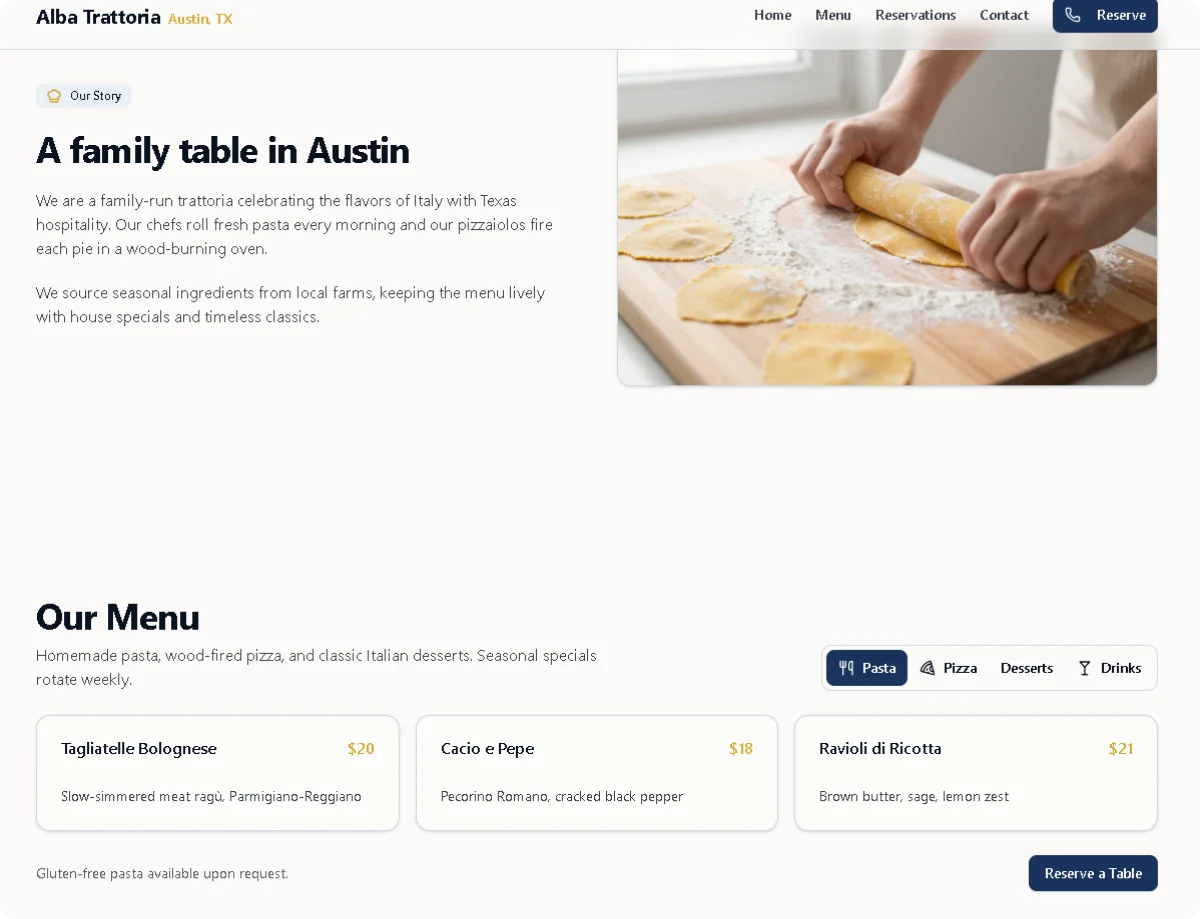
The entire process, from description to live site, takes minutes. Not because corners are cut, but because Codesi handles the parts that usually take the longest and hands you something that already looks like a real business.
Why spend days piecing together a site when yours could be live before your next meeting?
Start Codesi for free and see what your business looks like online in minutes.
Create your website with AI today
Codesi is a platform where you can make a website in 3 minutes.
No coding, no designers, no hassle - just AI.
