
Back to blog
Shopify vs. WooCommerce: Which One Is Right for You?
Compare Shopify vs WooCommerce and learn how to choose the right e-commerce platform based on control, setup flexibility, and long-term costs.

Mar 2 2026
If you’re starting an online store, you’ll run into this question quickly: Shopify or WooCommerce? Both can power a serious e-commerce business, but they work very differently once you get past the homepage demos.
Shopify gives you a hosted, all-in-one setup where most of the technical work is handled for you. WooCommerce runs on WordPress and gives you full control, but that control comes with more responsibility.
With e-commerce now making up over 20% of global retail sales, the platform you choose affects how you manage payments, updates, security, and long-term costs.
This Shopify vs. WooCommerce comparison breaks down how each platform performs in real-world use. We’ll look at setup, customization, built-in features, pricing, and scalability so you can decide which one actually fits how you want to run your business.
Shopify Overview

Shopify is a fully hosted e-commerce platform that lets businesses sell online without managing servers, security patches, or software updates. It handles the technical infrastructure in the background, so store owners can focus on products, marketing, and fulfillment instead of maintenance.
Launched in 2006, Shopify now powers millions of businesses in 175+ countries, from solo founders to large retail brands. Everything runs inside Shopify’s ecosystem, including hosting, checkout, payments (through Shopify Payments), and app integrations.
You sign up, choose a theme, add products, and can begin selling without configuring external hosting or installing core software.
Key Features
- Hosted infrastructure: Provides built-in hosting, SSL certificates, automatic updates, and security management
- Shopify Payments: Processes credit cards directly without third-party transaction fees when using Shopify’s native gateway
- App Store ecosystem: Extends functionality through thousands of apps covering marketing, shipping, subscriptions, accounting, and more
- Mobile-responsive themes: Offers professionally designed themes optimized for checkout and product presentation
- Built-in product management: Supports unlimited products, variants, inventory tracking, discount codes, and digital or physical goods
- Multi-channel selling: Connects products to Instagram, Facebook, TikTok, Amazon, and in-person sales through Shopify POS
Pros
- Simplifies setup by removing hosting and maintenance responsibilities
- Provides predictable infrastructure without server management
- Supports scaling without switching platforms
- Includes integrated payment processing
Cons
- Charges transaction fees when using external payment gateways
- Limits deep checkout customization outside Shopify Plus
- Creates dependency on Shopify’s hosting ecosystem
Pricing
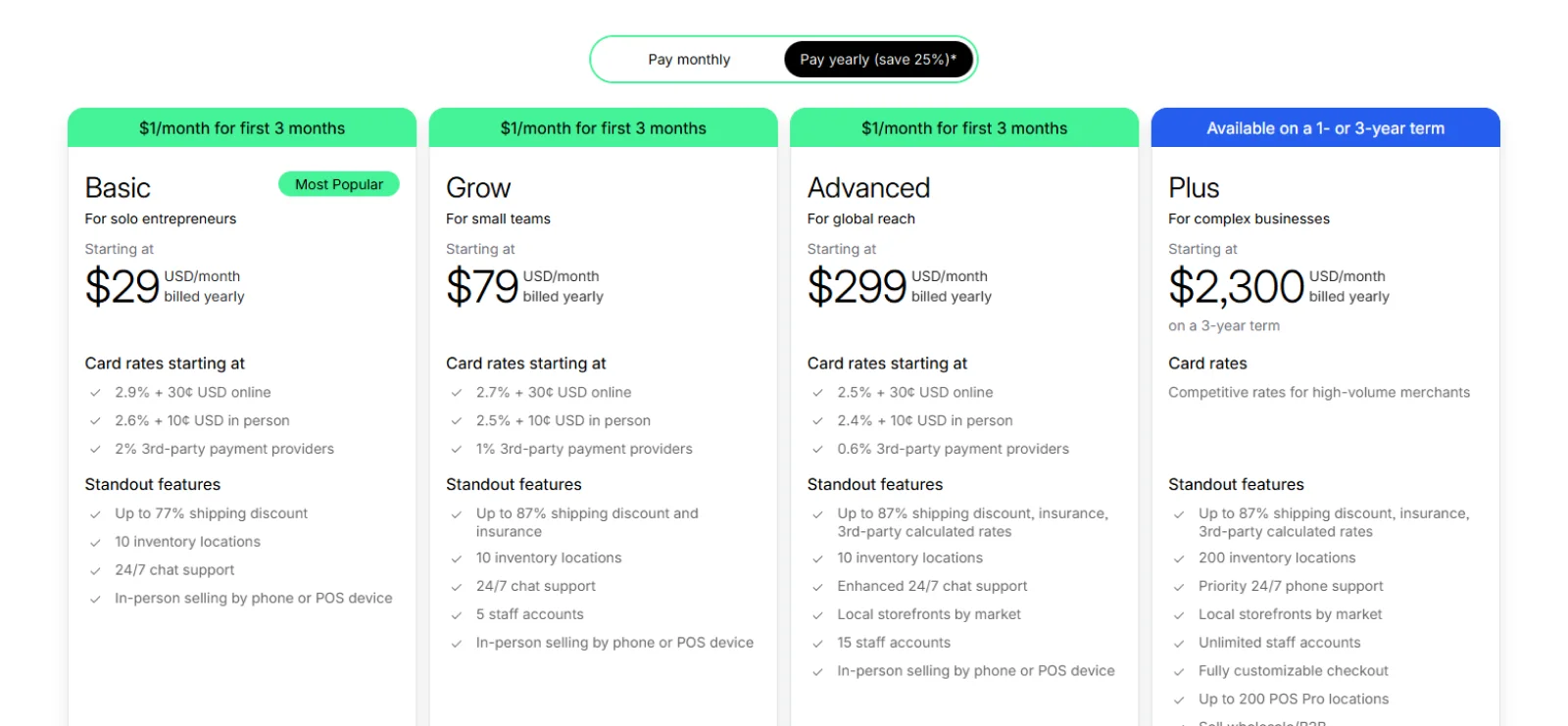
Shopify offers a 3-day free trial and a promotion that includes $1 per month for the first 3 months. Basic plans start at $27 per month ($19 per month when billed annually), with higher tiers available for advanced reporting and lower payment processing fees.
WooCommerce Overview
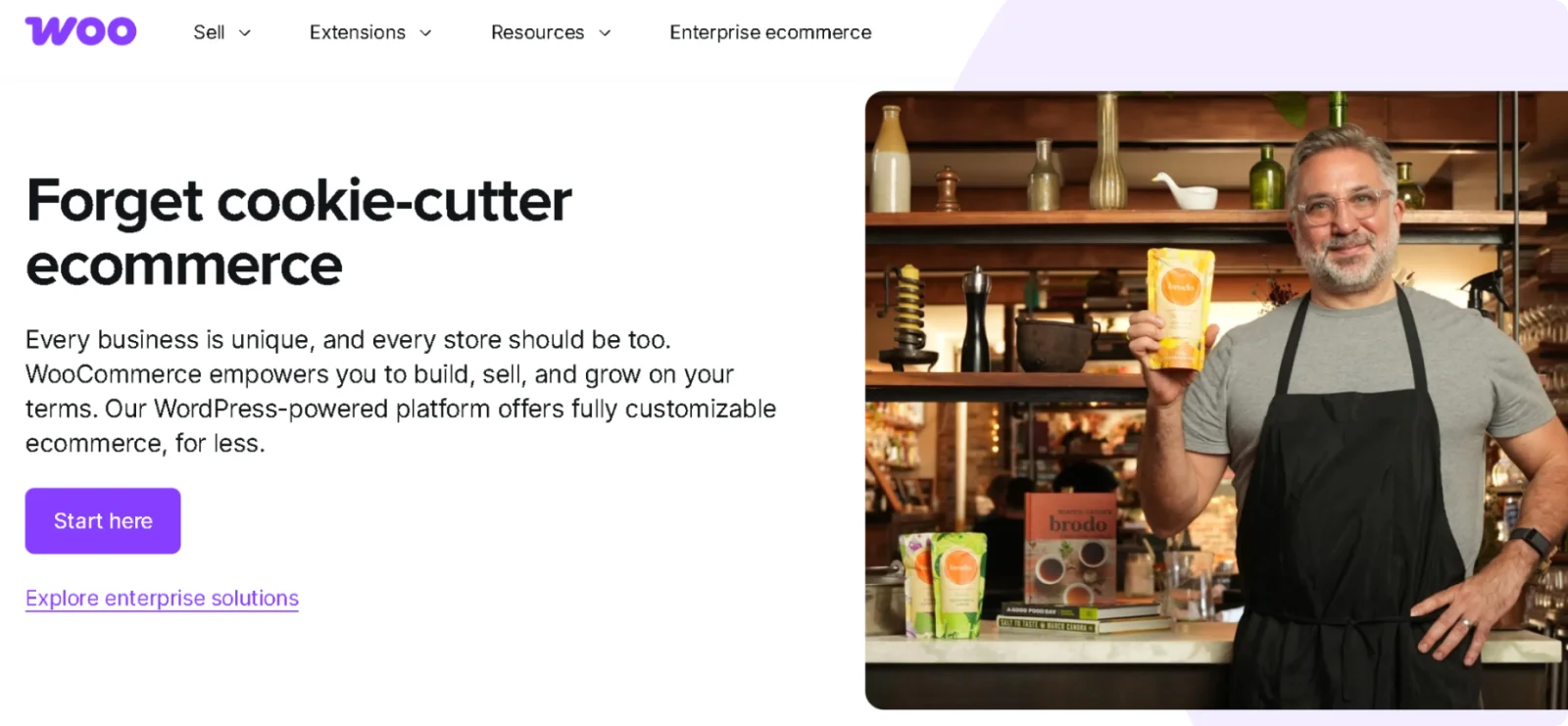
WooCommerce is an open-source e-commerce plugin built for WordPress. Unlike Shopify, it does not include hosting or infrastructure by default. You install it on a WordPress site, which means you control the server, security setup, updates, and overall environment.
Launched in 2011 and later acquired by Automattic (the company behind WordPress.com), WooCommerce powers a significant share of online stores globally.
Its flexibility is one of its biggest strengths. Because it runs on WordPress, you can modify nearly every aspect of your store through themes, plugins, and custom code.
Key Features
- Open-source foundation: Runs as a WordPress plugin with full access to code and customization
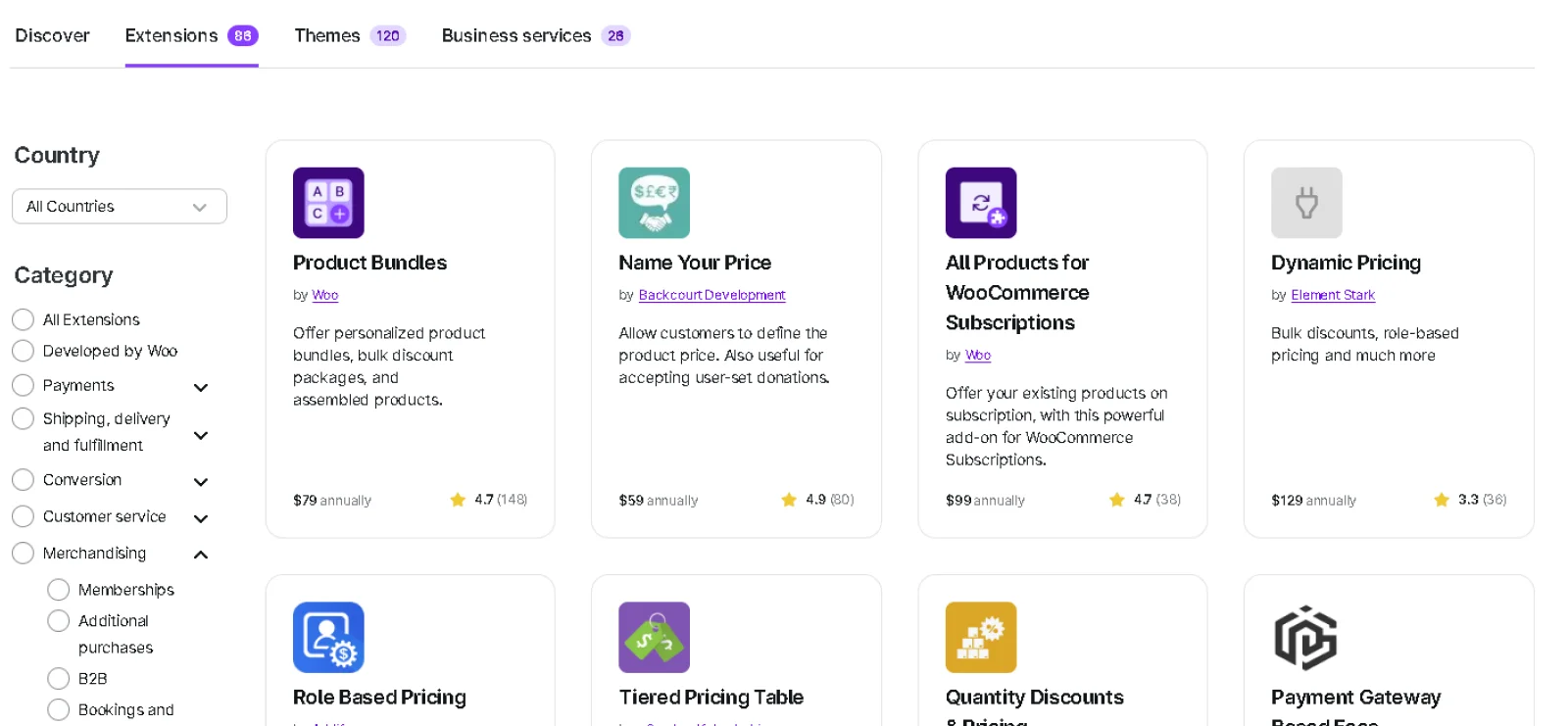
- Extension marketplace: Adds features through paid and free extensions for subscriptions, bookings, memberships, and advanced shipping
- Flexible payment integration: Connects with Stripe, PayPal, Square, and many regional gateways without platform lock-in
- Theme compatibility: Works with thousands of WordPress themes designed for e-commerce
- Content management strength: Combines blogging, SEO tools, and product management in one system
- Product configuration: Supports physical goods, digital downloads, variable products, affiliate products, and more
Pros
- Provides full control over store design and functionality
- Avoids platform lock-in through an open-source structure
- Offers wide payment gateway flexibility
- Scales through customizable hosting environments
Cons
- Requires separate hosting and domain management
- Places responsibility for security and updates on the store owner
- Involves additional costs for premium themes, plugins, and maintenance
Pricing
WooCommerce itself is free to install. Total costs depend on hosting, domain registration, premium extensions, payment processing fees, and any developer support you require.
Direct Comparison: Shopify vs. WooCommerce
When comparing Shopify vs. WooCommerce, the real difference comes down to control versus convenience. Here’s a side-by-side breakdown:
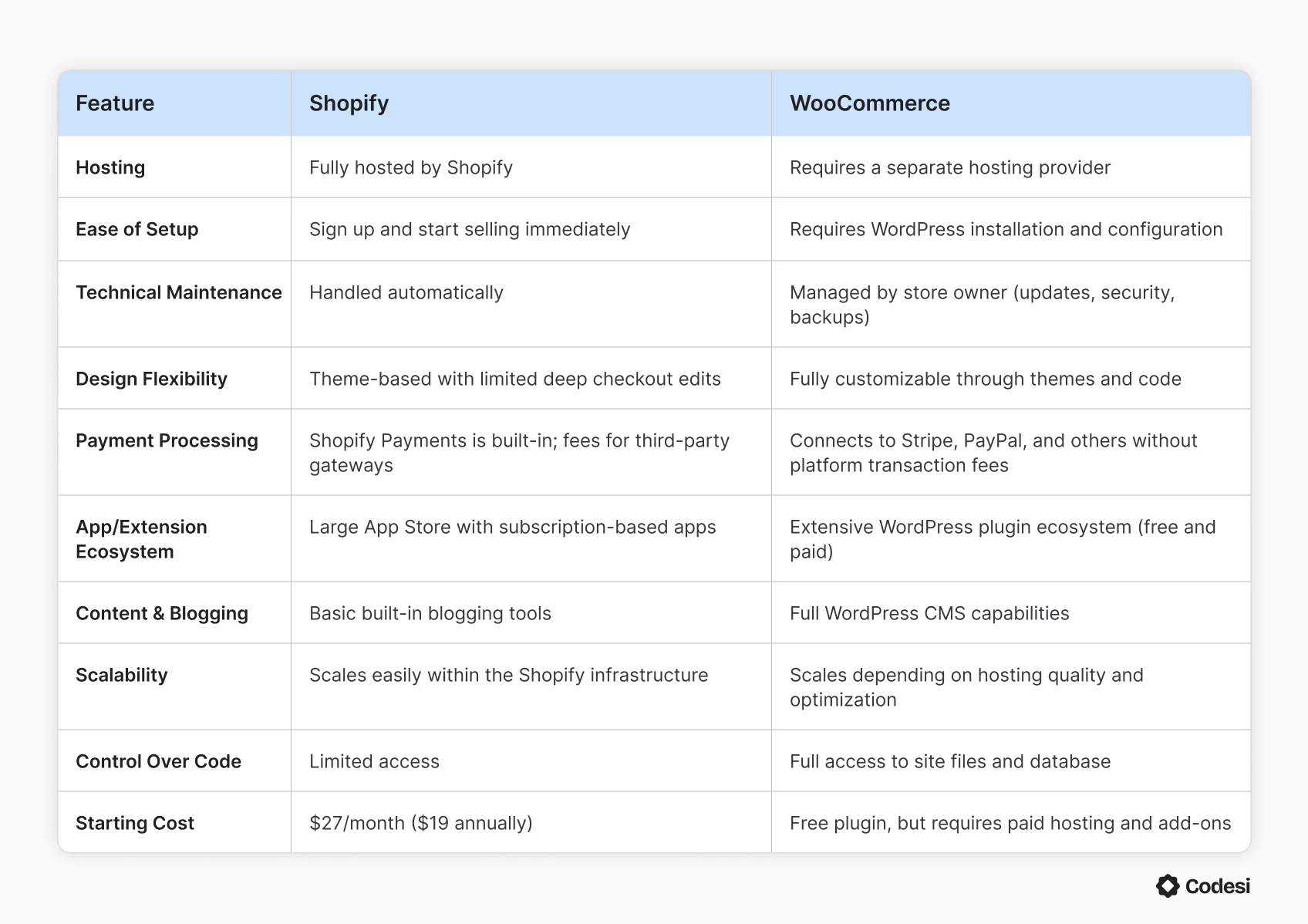
Hosting & Setup
The biggest difference between Shopify and WooCommerce appears before you even add your first product: hosting.
Shopify is fully hosted. When you create an account, hosting, SSL certificates, and server configuration are already handled for you. You don’t need to choose a hosting provider, install software, or manage server settings. Updates also run automatically in the background.
For many business owners, this removes a layer of technical decisions.
WooCommerce works differently. It runs on WordPress, so you’ll first need to purchase hosting, register a domain, install WordPress, and then install the WooCommerce plugin. You’re responsible for choosing a hosting provider, configuring performance settings, managing backups, and keeping software updated.
That difference affects ongoing operations.
With Shopify:
- Security patches are applied automatically.
- Infrastructure scaling is handled for traffic spikes.
- Checkout and payment systems are maintained by Shopify.
With WooCommerce:
- Hosting quality directly impacts site speed.
- You manage WordPress core updates, plugin updates, and theme updates.
- Security depends on your hosting setup and additional plugins.
So, if you want minimal setup and no server management, Shopify simplifies the process.
But if you want control over your hosting environment and the ability to optimize everything yourself, WooCommerce gives you that flexibility.
Ease of Use
Shopify is built for store owners who want to start selling without spending time on technical settings. After signing up, you’re guided through adding products, choosing a theme, setting up payments, and configuring shipping. Most settings are centralized in a single dashboard, and the interface is designed for non-technical users.
For many small businesses, that simplicity shortens the path from idea to live store.
WooCommerce has a different learning curve. Because it runs on WordPress, you first need to understand how WordPress works: themes, plugins, hosting, updates, and site structure. Installing WooCommerce itself is straightforward, but configuring payments, shipping rules, taxes, caching, and security can take more time.
The flexibility is powerful, but it assumes you’re comfortable managing multiple components.
In practical terms:
- Shopify favors guided setup and structured workflows.
- WooCommerce favors customization and control, which means more steps are involved.
If you want to launch quickly with fewer decisions, Shopify is generally easier to navigate. If you already use WordPress or prefer to manage your own environment, WooCommerce becomes easier to use over time.
Design & Customization
Design flexibility is another area where Shopify and WooCommerce take different approaches.
Shopify uses a theme-based system. You choose a theme from the Shopify Theme Store, customize colors, fonts, layout sections, and product page elements through a visual editor, and publish. The newer Online Store 2.0 themes allow drag-and-drop sections on most pages, including the homepage and product templates.
For many businesses, this is enough.
However, deeper customization—especially around checkout—has limits unless you’re on Shopify Plus.
WooCommerce is more open-ended. Because it runs on WordPress, you can use thousands of compatible themes or build your own. Developers can modify templates, override theme files, adjust product page layouts, and edit CSS or PHP directly. There are fewer structural restrictions.
This flexibility comes with trade-offs. Customizing WooCommerce often requires familiarity with WordPress themes and plugin compatibility.
In practical terms:
- Shopify offers structured customization with guardrails.
- WooCommerce offers deep customization with full code access.
If you want a polished storefront with minimal setup, Shopify keeps design straightforward. If you want full control over the layout, functionality, and underlying code, WooCommerce offers greater flexibility.
E-commerce Features
Shopify includes most core e-commerce tools inside the platform:
- Unlimited products and product variants
- Built-in inventory tracking
- Integrated Shopify Payments with major credit cards and wallets
- Discount codes and gift cards
- Abandoned cart recovery (on standard plans and above)
- Multi-channel selling (social media, marketplaces, POS)
- Built-in shipping and tax configuration
WooCommerce provides core e-commerce features through its plugin, with expansion through extensions:
- Simple, variable, digital, and affiliate products
- Inventory management and coupon creation
- Flexible shipping zones and tax settings
- Integration with Stripe, PayPal, Square, and other gateways
- Extensions for subscriptions, bookings, memberships, and advanced product types
Shopify centralizes most features in one system. WooCommerce builds functionality through add-ons and plugins.
Pricing & Cost Breakdown
Shopify uses subscription-based pricing. Plans start at $27 per month ($19 per month when billed annually). Payment processing fees apply unless you use Shopify Payments, and transaction fees are added when using third-party gateways.
Additional costs may include premium themes and paid apps, which often operate on monthly subscriptions.
WooCommerce is free to install, but costs come from hosting, domain registration, premium themes, paid extensions, and payment gateway fees. Quality-managed WordPress hosting typically ranges from $10 to $30 per month for small stores, and advanced functionality can increase costs depending on the required extensions.
There are no platform transaction fees from WooCommerce itself.
Shopify provides predictable monthly pricing. WooCommerce offers lower entry costs but more variable long-term expenses depending on your setup.
Shopify vs. WooCommerce: Which Should You Choose?
With Shopify, hosting performance and security are handled by the platform. SSL certificates are included, updates are automatic, and infrastructure scaling is managed internally. Store owners do not manually configure servers or apply security patches. Shopify also maintains PCI compliance for payment processing within its ecosystem.
WooCommerce performance depends entirely on your hosting provider and configuration. You are responsible for choosing reliable hosting, setting up caching, managing backups, and keeping WordPress, themes, and plugins up to date. Security is also your responsibility, often handled through hosting features and security plugins. PCI compliance depends on your payment gateway and hosting setup.
Your choice depends on your preferences regarding the level of control and flexibility you want, the technical knowledge you have, and the time available for ongoing management. Shopify reduces operational responsibility, while WooCommerce increases flexibility but requires active management.
Codesi: A Faster Way to Launch Your E-commerce Website
Shopify and WooCommerce both require you to build your store piece by piece. You choose a theme, configure payments, structure product pages, install extensions, and write your content before you can publish. Even with templates, assembly is still involved.
Codesi removes most of that upfront work. Instead of starting with settings and layouts, you describe your store in plain language. The platform generates a structured e-commerce website with branding, visuals, and product-focused sections already in place.
Here’s what makes Codesi a practical alternative for fast e-commerce launches:
- Prompt-based site generation: Creates a complete branded e-commerce website from a single description
- Integrated logo creation: Creates brand-aligned logo options during the same setup process
- Custom visual output: Generates AI images tailored to your store’s positioning
- Structured product sections: Builds product highlights and calls to action automatically
- Built-in hosting setup: Publishes with SSL and hosting included, without external configuration
Codesi is designed for founders and small businesses that want to move quickly without managing plugins, servers, or complex dashboards. If your priority is getting a professional e-commerce presence live without the usual setup steps, it offers a more direct path.
Ready to launch your online store without getting stuck in setup and configuration?
Start Codesi for free and generate your e-commerce website in minutes.
Create your website with AI today
Codesi is a platform where you can make a website in 3 minutes.
No coding, no designers, no hassle - just AI.
