
Back to blog
8 Tips on How to Create a Landing Page on Squarespace
Learn how to make a landing page on Squarespace that drives conversions with clear messaging and simple steps you can follow without code.

Jan 8 2026
Landing pages achieve an average conversion rate of 5.89% across industries, significantly outperforming traditional web pages that often offer too many options and lack focus.
For small business owners launching products, freelancers building client lists, or event organizers driving RSVPs, Squarespace provides a platform to build conversion-focused pages without code. The platform's drag-and-drop editor gives beginners design control that was previously limited to developers.
These eight tips will help you create a landing page on Squarespace that generates measurable results.
What Is a Landing Page, and Why Create One on Squarespace?
A landing page is a standalone web page designed for one conversion goal. Unlike your homepage, which serves multiple purposes and includes navigation to your entire site, a landing page directs visitors toward a single specific action.
These pages work across multiple scenarios. For example, lead generation pages capture email signups and consultation requests, while sales pages drive product purchases and subscription signups.
Squarespace suits this task because it requires no coding knowledge:
- The platform includes mobile-responsive templates that adapt automatically to phones and tablets, which means your landing page will look professional on any device.
- Built-in SEO tools handle title tags and meta descriptions without requiring technical expertise.
- Marketing integrations connect with services like Mailchimp and Zapier, allowing you to automate follow-up processes.
Since Squarespace handles hosting and security automatically, you can publish a landing page the same day you start building.
8 Tips for Building a High-Converting Landing Page on Squarespace
Creating an effective landing page requires more than just technical setup. You need to make strategic decisions about design, content, and optimization that work together to guide visitors toward conversion.
The following eight tips cover everything from choosing the right starting point to optimizing for search engines and visitor action.
1. Choose the Right Template for Your Goal
Squarespace offers website templates designed for different landing page purposes. Your template choice sets the foundation for everything that follows, so understanding which templates work best for specific goals helps you start strong.
The platform organizes templates by use case, making it easier to find designs that match your industry and conversion objective. Each template comes with pre-built sections that you can customize to fit your brand.
To choose a template, log into your Squarespace account and navigate to your website dashboard. Click on "Design" in the left sidebar, then select "Template" to browse available options. You can filter templates by category to find designs that match your specific needs.
Here are some popular landing page templates and their features:
1. Essex

- Features: Bold typography, scroll-triggered animations, prominent header CTA button; designed for digital products and SaaS platforms
- Pros: Immediate visual impact with a clean layout keeps focus on product features
- Cons: May feel too tech-focused for service-based businesses
2. Byron
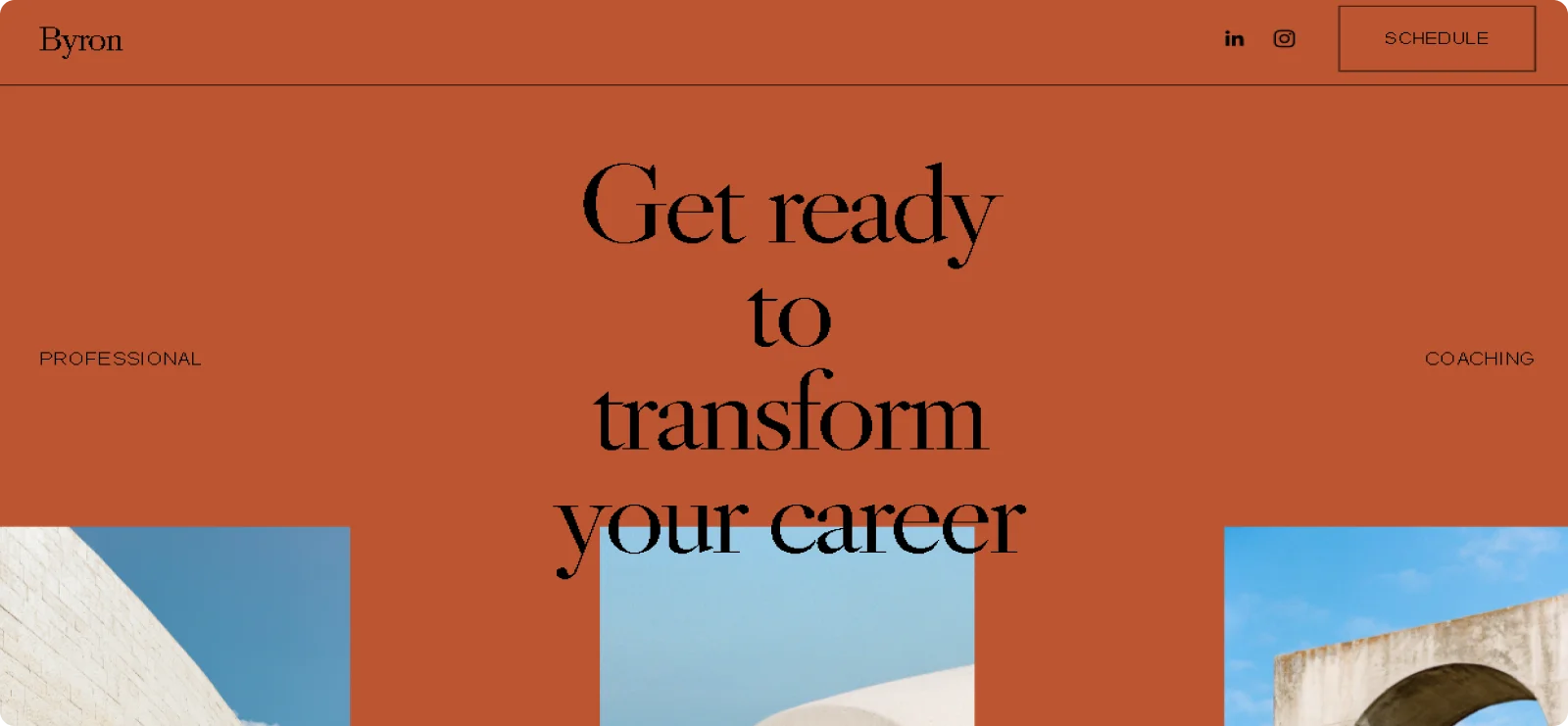
- Features: Ample space for testimonials, case studies, and service breakdowns; built for coaches and consultants
- Pros: Emphasizes trust-building elements, supports long-form content, professional layout
- Cons: Less suitable for product-focused businesses that need visual galleries
3. Mariana

- Features: Full-screen header images, gallery blocks for multiple products, built-in signup forms
- Pros: Immediate visual impact, organized product display, no additional email capture tools needed
- Cons: Requires high-quality photography to look professional
4. Devoe

- Features: Minimalist design with clean aesthetic; perfect for portfolios and personal brands.
- Pros: Puts work front and center, no competing visual elements, works for single project focus
- Cons: Limited space for detailed service descriptions or multiple offerings
5. Fayette

- Features: Form blocks with pop-up attendance forms, built-in RSVP functionality; optimized for events
- Pros: Streamlines registration, no third-party event tools needed, efficient for announcements.
- Cons: Less flexible for non-event landing pages.
Once you select a template based on your industry and goal, you can customize colors, fonts, images, and layout to match your brand identity perfectly.
2. Set Up Your Page with a Blank Layout
After selecting your template, create your landing page with a clean foundation that gives you full control over the design. Squarespace's blank page option lets you build from scratch without preset layouts that might not match your conversion goals.
Follow these steps to create your landing page:
- Open the Pages panel in your Squarespace dashboard and click the plus icon (+) next to "Not Linked." This keeps your landing page out of your main navigation, perfect for campaign-specific pages you'll share via direct links.
- Select "Blank Page" from the page type options and give your page a clear title like "Free Audit" or "Holiday Sale" that helps you identify it later in your dashboard.
- Click "Start Editing" to open the page editor, then click "Add Section" to begin building your layout. You can choose from pre-designed sections, or you can select "Add a blank section" for complete customization.
- Add content blocks by clicking "Add Block" within your section. Each block serves a specific purpose in your landing page structure.
- Arrange blocks using the drag-and-drop editor. Squarespace uses a grid system that lets you position elements precisely where you want them on the page.
For long-scrolling landing pages, add multiple sections stacked vertically. Each section can have its own background color, image, or video to create visual separation between your value proposition, testimonials, features, and call-to-action areas.
3. Hide the Header and Footer to Remove Distractions
Once your page structure is in place, remove the header and footer to keep visitors focused on your conversion goal. Landing pages convert better without navigation menus that distract visitors.
Squarespace provides built-in settings to hide headers and footers on individual pages:
- Navigate to your Pages panel and hover over your landing page title until you see the gear icon.
- Click the gear icon to open page settings.
- Select the "Navigation" tab from the settings menu on the left.
- Toggle off "Show Header" to remove your site's navigation menu from this page.
- Toggle off "Show Footer" to hide footer content and keep attention on your landing page content.
- Click "Save" to apply your changes.
The header and footer will remain visible on all other pages of your site. This method works for regular pages and layout pages.
4. Write a Compelling Headline and Clear Call-to-Action
With your page structure in place and distractions removed, the next critical step is creating content that convinces visitors to convert. Your headline and call-to-action determine whether visitors stay or leave within seconds.
Your headline should communicate benefits, not features. "Get Your Custom Marketing Plan in 48 Hours" outperforms "Marketing Consulting Services" because it emphasizes the outcome. Use specific numbers, keep headlines under 10 words, and match visitor intent directly.
Your subheadline should expand on this idea with one sentence addressing the pain point. For example, "Our checkout optimization removes the three friction points that cause customers to abandon purchases."
Finally, your call-to-action section needs strategic attention:
- Use contrasting button colors that stand out from your background.
- Write action verbs: "Start Your Free Trial," "Download the Guide," "Reserve Your Spot."
- Place CTAs above the fold and repeat every 2-3 sections on longer pages.
- Limit to one primary action to avoid splitting attention.
These elements create a clear path from first impression to conversion.
5. Add High-Quality Visuals and Content Blocks
After crafting your headline and CTA, you need to fill your landing page with content that supports your conversion goal. Squarespace provides content blocks that let you build your page section by section, each serving a specific purpose.
The essential content blocks for landing pages include:
- Text blocks: Communicate your value proposition focused on outcomes rather than features
- Image blocks: Show your product in use with compressed files for fast loading
- Gallery blocks: Display before-and-after comparisons or portfolio samples (limit to six best examples)
- Form blocks: Capture leads with minimal fields (name and email convert better than long forms)
- Video blocks: Increase conversions by 86% with product demos or testimonials under 90 seconds
- Quote blocks: Display testimonials with names, photos, and specific results
Content consistency matters for conversion. Your images must match your message, your information must align with what brought visitors to the page, and your overall design should reflect your brand identity.
Use whitespace strategically to avoid overwhelming visitors with cramped sections.
6. Optimize for Mobile and Page Speed
After adding your content blocks, ensure your landing page works flawlessly on mobile devices. Mobile traffic accounts for 64% of internet usage, making mobile optimization non-negotiable for conversion success.
Use Squarespace's built-in mobile preview while editing to see how your page appears on different devices. Test on actual phones to catch button size issues, text readability problems, and form interaction difficulties. Ensure buttons are large enough to tap easily, and separate interactive elements to prevent accidental taps.
Speed optimization starts with images:
- Compress all image files before uploading to maintain fast loading speeds.
- Minimize autoplay videos that slow initial page loads.
- Limit third-party scripts and plugins that add loading time.
Squarespace enables lazy loading by default, meaning images load as visitors scroll rather than all at once.
7. Set Up Forms and Integrate Email Marketing Tools
Once your page is optimized for speed, you should configure your forms to actually capture the leads your landing page generates.
Form setup requires specific configuration:
- Add a form block and place it after you've communicated value
- Keep fields minimal
- Click the form block and select "Storage" from settings
- Add your email address where submissions should be sent
- Enable Google reCAPTCHA to prevent spam
- Save your settings before publishing
Without a storage configuration, your form won't appear on your live site even though you see it while editing.
Squarespace connects with major email platforms including Mailchimp, ConvertKit, Zapier, and Google Drive for automated lead nurturing. Offer lead magnets like free guides or discount codes to increase form completion rates.
8. Optimize for SEO and Conversions
With your landing page built and forms configured, the final step ensures search engines can find your page so that visitors can take action.
SEO configuration requires these essential steps:
- Click the gear icon next to your landing page and select the SEO tab.
- Create a page title under 60 characters with your target keyword.
- Write a meta description, and keep it between 150 and 160 characters.
- Customize your URL slug to be short and keyword-rich ("/free-audit" not "/page-1").
- Use one H1 tag for your headline and H2/H3 tags for section headers.
- Add descriptive alt text to all images.
Conversion optimization requires ongoing testing: A/B test different headlines, CTA button colors, and form placements to discover what works. Also, add social proof through testimonials, and consider creating urgency with time-limited offers.
When all the above is done, you should track your performance through Google Analytics or Squarespace Analytics; monitor conversion rate, bounce rate, time on page, and button clicks to identify opportunities for improvement.
Why Codesi Is a Faster Alternative for Creating Landing Pages
Squarespace provides powerful landing page tools with extensive customization. However, learning the platform and building professional pages from scratch takes time.
Codesi uses AI to generate complete landing pages in minutes. All you need to do is answer a few questions about your business, and the AI creates a landing page with layout, copy, and design already in place. This eliminates the learning curve entirely.
The platform also generates business names, custom slogans, unique logos, and custom brand images. You get everything you need in one place.
Codesi works best when you:
- Need landing pages urgently for campaigns launching soon
- Want AI assistance with copywriting, design, and branding
- Prefer simplified workflows without technical setup or learning curves
- Are testing business ideas before committing to full website development.
Are you ready to build your landing page in minutes?
Try Codesi today and get your campaign live fast. No credit card required to start.
Create your website with AI today
Codesi is a platform where you can make a website in 3 minutes.
No coding, no designers, no hassle - just AI.
