
Back to blog
How to Choose the Right Website Builder for You? [Guide]
Learn how to choose the best website builder and find the right platform based on your needs, budget, and goals for building and growing your site.

Apr 1 2026
![How to Choose the Right Website Builder for You? [Guide]](https://codesi.ai/admin/static/cov07_f53aa101c9.webp)
Choosing the right website builder comes down to matching the platform's strengths to what your website actually needs to do. Nearly 69% of small businesses establish a website within their first year, with builder platforms used by about 63% of those businesses. Yet, picking the wrong one remains one of the most common and costly mistakes a business owner can make.
This guide explains how to choose the right website builder by covering every factor to consider before committing to a platform.
Key Takeaways
- The right website builder depends on your website type, your technical comfort level, and the number of tasks the website needs to handle beyond looking professional.
- Ease of use and design flexibility pull in opposite directions; platforms that are easier to use typically offer less customization, and finding the right balance matters more than chasing features you will never need.
- Hidden costs are the most common reason businesses switch builders after launch. Pricing transparency should be a filter, not an afterthought.
- AI-powered builders have changed what is possible for non-technical users, reducing a multi-day setup process to under an hour without sacrificing design quality.
What Type of Website Do You Need?
The type of website you are building should be the first filter, not the last. A platform built for e-commerce adds unnecessary complexity for a service business that only needs a contact form, and a portfolio builder often lacks the booking tools a consultant needs from day one.
Here are the five most common website types and what each one demands from a builder:
- Personal or portfolio site: Needs a clean design, fast load times, and an easy way to showcase work without ongoing technical maintenance
- Small business website: Needs local SEO tools, a contact or booking form, and a mobile-optimized layout that works for walk-in and online customers
- E-commerce store: Needs product management, payment gateway integration, inventory tracking, and a checkout flow that does not require third-party plugins to function
- Blog or content site: Needs a CMS, category and tag structure, and strong SEO architecture to support consistent publishing over time
- Landing page: Needs a single focused layout with one clear call to action, no navigation links, and a form or button that captures leads without distraction
7 Things to Look for in a Website Builder
Not every feature on a builder's pricing page is relevant to your use case. These seven criteria determine whether a platform will work for your business in the long term, not just during the free trial.
1. Ease of Use
Ease of use means different things depending on your starting point. For someone with no web design background, it means getting a professional site live without consulting a tutorial for every step. For a developer, it means having enough control to customize without having to fight the platform's constraints.
The honest question to ask is not "is this easy to use", but "is this easy for me to use, given what I need it to do?" A platform that feels simple in a demo can become frustrating once you try to do something it was not designed for.
2. Design Flexibility
Design flexibility determines how closely the finished site can match your brand without hiring a developer. Most beginner-friendly builders offer templates that look professional out of the box but limit how far you can push the design.
Switching templates after launch often means rebuilding from scratch, which is a constraint you should be aware of before you start building a site.
For most small businesses, a well-designed template with limited customization is enough. For agencies and brands with a strong visual identity, the design ceiling matters more.
3. E-commerce Features
If selling online is part of the plan, e-commerce capability should be a primary filter. Entry-level builders cover the basics: product listings, payment gateways, and order management.
The gaps show up when you need subscriptions, variable pricing, B2B wholesale, or multi-currency support. Many platforms charge extra for these via paid plugins or higher-tier plans, making the real cost of e-commerce higher than the base subscription suggests.
4. SEO Tools
A website that does not show up in search results does not generate leads. At minimum, a builder should let you control page titles, meta descriptions, image alt text, and URL structure.
Beyond that, look for support for sitemap generation, schema markup, and mobile performance optimization. Google uses mobile-first indexing, meaning the mobile version of your site determines your search ranking, which makes mobile optimization a non-negotiable.
Closed platforms handle SEO automatically but limit technical depth. Self-hosted platforms offer full control but require configuration to achieve it.
5. Pricing and Hidden Costs
The advertised monthly price is rarely what you end up paying. Most builders charge separately for a custom domain, an SSL certificate, email hosting, and advanced features such as booking or e-commerce. These add-ons can push the real monthly cost well above what the base plan suggests.
Also, look beyond the introductory rate. Many platforms offer steep first-year discounts that jump significantly on renewal.
6. Customer Support
Support quality only becomes obvious when something goes wrong. A builder with 24/7 live chat and phone support is a different experience from one that relies on community forums and documentation when you need a fast answer.
For non-technical users, accessible support is not optional. A broken contact form or a site that goes down before a product launch needs a direct line to someone who can fix it, not a ticket system with a 48-hour response window.
Check what support channels are available on the plan you intend to use, not the enterprise tier.
7. AI Capabilities
AI has changed what non-technical users can realistically build without a designer or developer. The best AI-powered builders generate complete sites from a plain-language description, handling layout, copy, images, and SEO structure automatically in a single step.
The gap between AI builders and traditional drag-and-drop platforms is widening. A builder with strong AI capabilities reduces setup time, generates original designs, and handles technical decisions such as mobile optimization and domain connections without user input.
For business owners who want a professional site without a setup process, AI capability is now the most important criterion on this list.
Which Website Builder Type Is Right for You?
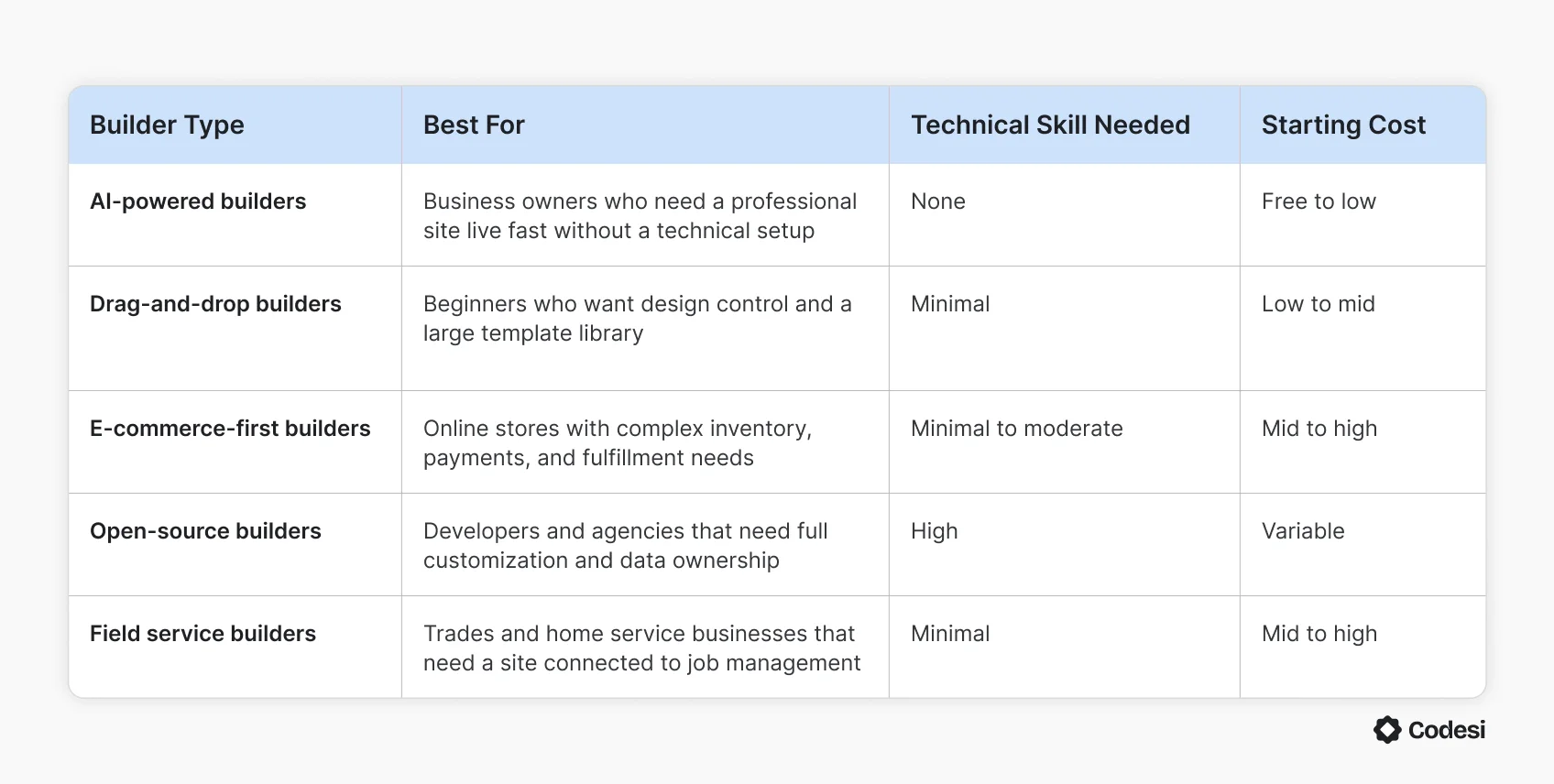
Every builder on the market falls into one of five categories. The table below maps each type to the use case it serves best, so the decision starts with the right category before narrowing down to a specific platform.
5 Questions to Ask Before Choosing a Website Builder
Most people compare features before asking whether the platform actually fits their workflow. These five questions cut through the noise before you commit to anything:
- What does your website need to do in the next 12 months? A site that only needs to show up in local search and capture inquiries has very different requirements from one that needs to process transactions, manage bookings, or publish content regularly.
- How much time are you willing to spend on setup and maintenance? Some platforms require ongoing technical management, including updates, backups, and plugin compatibility checks. Others handle all of that automatically in the background.
- Do you need to own your site files and data outright? Closed platforms make migration difficult if you decide to switch later. If long-term data ownership matters, a self-hosted or exportable platform is worth the extra setup effort.
- Will the site need e-commerce or booking features later? Adding these to a platform not built for them usually means paying for third-party integrations or switching to a different builder entirely. Starting on a platform that supports future growth saves a costly migration down the line.
- What happens if you outgrow the platform? Every builder has a ceiling. Knowing where that ceiling is before you build prevents a business from being stuck on a platform it has already outgrown, with no clean way out.
Common Mistakes to Avoid When Choosing a Website Builder
Most people research features carefully and still end up switching platforms within a year. The reasons are almost always the same, and almost always avoidable:
- Choosing based on price alone: The cheapest plan rarely covers what a real business website needs. Introductory rates expire, add-ons stack up, and the platform that costs the least upfront often ends up costing the most to maintain or migrate away from later.
- Ignoring mobile performance: Over 60% of web traffic comes from mobile devices, yet most people evaluate builders on a desktop. A site that looks great on a laptop but loads slowly or displays poorly on a phone loses visitors before they read a single line.
- Picking a platform you cannot migrate from: Closed platforms keep your content, design, and domain history locked inside their ecosystem. If the platform changes its pricing, discontinues a feature, or simply stops meeting your needs, starting over is the only option.
- Underestimating ongoing maintenance: Some builders require regular updates, plugin compatibility checks, and security patches. That overhead is manageable for a developer, but it can be genuinely disruptive for a business owner.
- Testing the demo instead of the real product: Free trials and demos show the best-case experience. The real test is trying to do something specific your business needs, like adding a booking form, connecting a payment gateway, or updating a service page, and seeing how long it actually takes.
- Overlooking customer support quality: Most people think of customer support only when something goes wrong. A builder with no live support channel is a liability for any business that depends on its website to generate leads or process sales.
Why Codesi Is the Best Website Builder for You
For most business owners, the website is the last thing that gets done—not because it is unimportant, but because every builder on the market turns it into a project. You pick a template, configure hosting, connect a domain, adjust SEO settings, and only then do you start building the actual site.
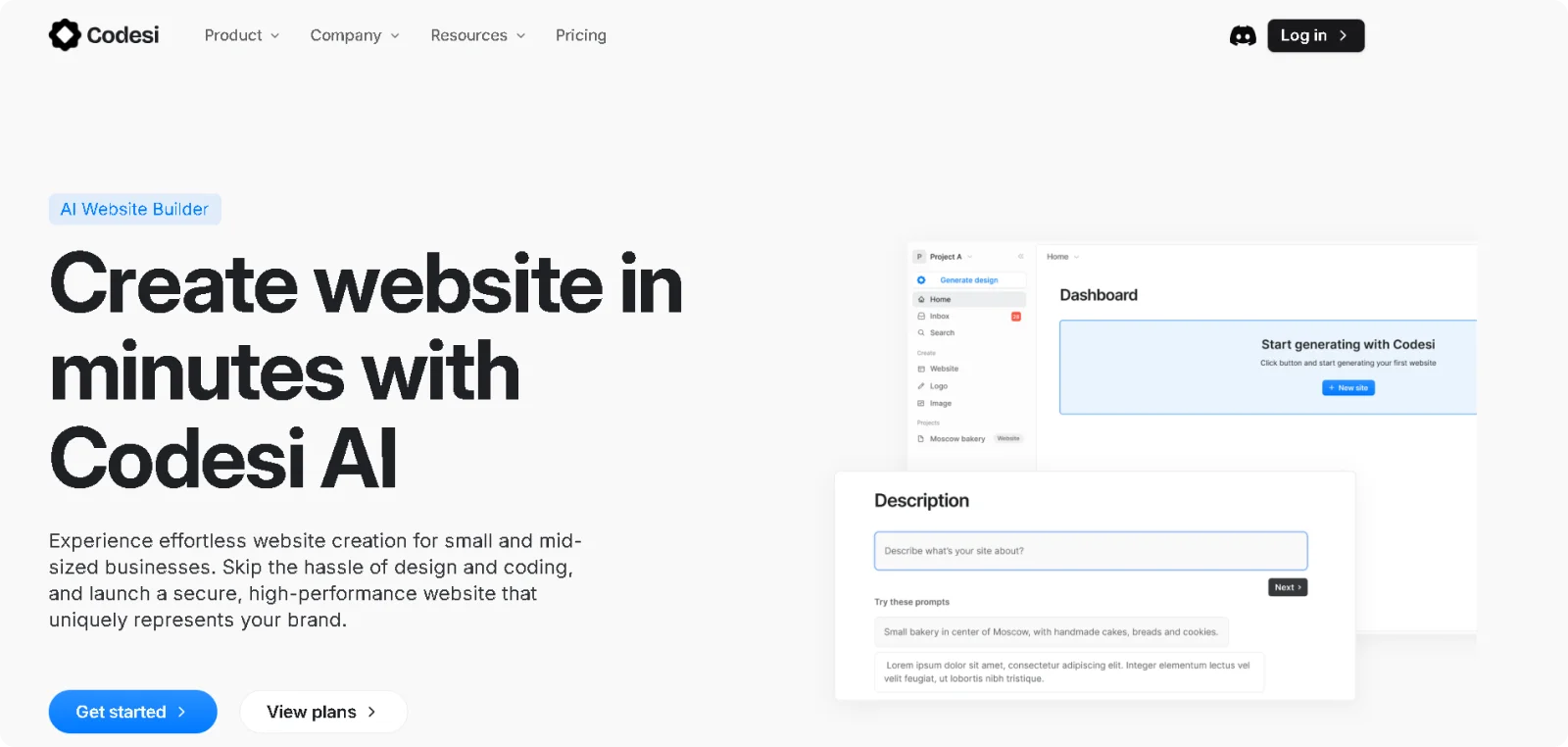
Codesi skips that entirely. Describe your business in plain language, choose a visual style, and the platform generates a complete, branded website in under three minutes. The site that comes out is not a blank canvas. It is a structured, ready-to-publish page built around your specific input.
What every generated site includes from the start:
- AI site generation: Produces a fully structured website with copy, AI images, contact forms, and page layout from a single business description
- Built-in SEO structure: Configures meta titles, descriptions, mobile optimization, and site speed automatically before the first publish
- AI logo and image creation: Generates custom logos and brand visuals matched to your business context without stock photo subscriptions or separate design tools
- Live visual editing: Lets you modify text, swap images, and rearrange sections directly on the page after generation without touching code
- Custom domain connection: Links a new or existing custom domain with SSL included directly from the dashboard, no third-party configuration required
- Free plan with no time limit: Includes one website generation per day, full editor access, and one month of free hosting before spending anything
Every criterion in this guide points toward a builder that removes decisions rather than adding them. Codesi is built around that idea from the ground up.
What would it mean for your business to have a professional site live before the end of today?
Start Codesi for free and generate your website in minutes.
FAQ
Which website builder is easiest to use?
AI-powered builders are currently the easiest entry point for non-technical users. They generate a complete, structured site from a description, without requiring coding, template selection, layout configuration, or any design decisions. Traditional drag-and-drop builders are the next easiest option, though they still require manual setup before anything goes live.
What is the best free website builder?
Several builders offer useful free plans, including Codesi, which includes one website generation per day, full editor access, and one month of free hosting. Most free plans include platform branding and a subdomain rather than a custom domain, which is worth factoring in if a professional web address matters from day one.
How do I know which website builder to choose?
Start with the type of website you need, then filter by ease of use, e-commerce requirements, SEO tools, and pricing transparency. Ask what the platform costs in year two, what happens if you need to migrate, and whether the support available matches the level of technical help your business might need.
Create your website with AI today
Codesi is a platform where you can make a website in 3 minutes.
No coding, no designers, no hassle - just AI.
