
Back to blog
Choosing a Website Builder in 2026: What Should You Know
Learn everything you need to know about choosing a website builder so you can match features, skills, and goals to build the right site for you.

Jan 26 2026
Small and medium-sized businesses need websites to compete online, which is why 46% of SMEs now use website-building tools. The challenge comes from the disconnect between marketing and reality.
Different platforms serve different purposes: A portfolio site needs features different from those of an online store, and a blog has requirements different from those of a landing page. However, when every builder markets itself as the universal solution, how do you decide which one is the best?
To make it easier, this guide walks you through everything you should know before choosing a website builder in 2026.
Key Takeaways
- Different builder types serve different needs
Drag-and-drop platforms offer complete design freedom, while AI generators launch sites in minutes with minimal input. Code-friendly tools give developers clean output they can customize further, and e-commerce builders handle inventory and payments natively without requiring plugins.
- Ownership terms affect future flexibility
Some platforms let you export everything. Others lock your content within their system, forcing complete rebuilds if you wish to switch later.
- Skill level matters more than popularity
Beginners struggle with code-friendly platforms, while experienced designers tend to feel limited by simple builders. Match tools to your current abilities, not aspirations.
- Codesi removes the setup phase entirely
Describe your business and get a complete site with copy, images, and layouts in under five minutes.
What Is a Website Builder, and How Does It Work?
A website builder is software that lets you create and publish websites without writing code. You work through a visual interface where changes appear as you make them. The builder also handles hosting, security certificates, and mobile formatting automatically.
The setup is straightforward: You sign up, pick a starting point, add your content, and publish to make your site go live immediately on a domain you choose.
Behind the scenes, the builder stores your content on servers and generates the code needed to display your pages. When someone visits your site, those pages load quickly from servers located around the world. Updates happen automatically, so you don't have to manage any technical tasks.
Custom web development works differently, requiring you to hire someone to write code, set up hosting, configure security, and handle ongoing maintenance, with each piece costing separately. Website builders, on the other hand, bundle everything into one monthly fee.
Before builders became reliable, companies paid thousands upfront for custom websites—then paid again every time they needed changes. Builders removed those separate costs and made website management accessible without technical teams.
4 Types of Website Builders in 2026
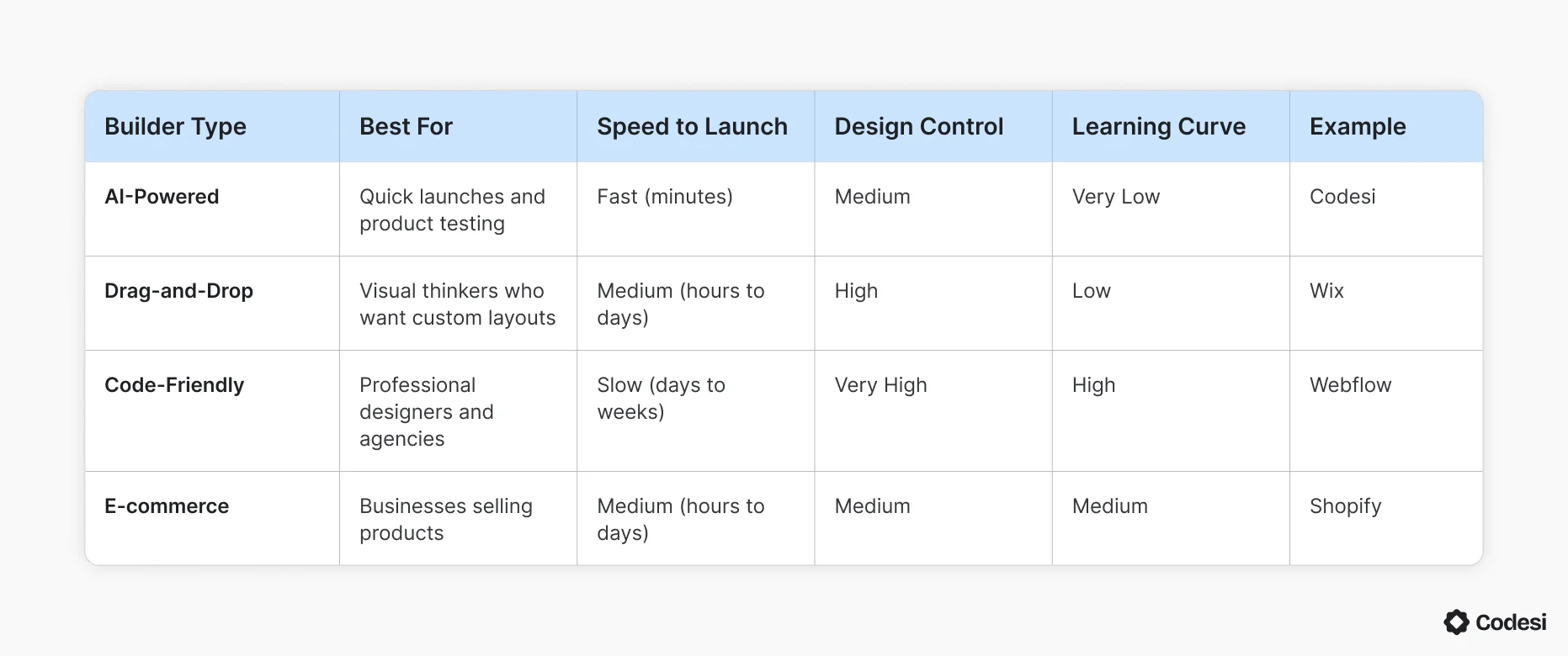
Website builders split into four different types based on how you build and what you can create. Here's how they compare:
1. AI-Powered Generators
AI generators build complete websites from text descriptions. A perfect example of an AI website builder is Codesi, which allows you to describe your business and get pages, copy, and images in minutes. Key characteristics of AI-powered website builders include:
- Text-to-website generation: Describe what you need and receive a complete site in minutes.
- Automated content creation: Get copy and branded images generated automatically by the platform.
- Structured customization: Adjust colors and images after generation, while the core layout follows proven patterns.
The tradeoff is specificity; you get a professional site that fits your business type, but not the exact custom layout you pictured. This makes it more suitable when speed is the priority.
2. Drag-and-Drop Builders
Drag-and-drop builders let you place elements anywhere on a page by simply clicking on them and dragging them. You see exactly what your visitors will see.
Wix is the most popular example in this category, giving you complete control over element placement and page layouts.
Here are some features of drag-and-drop website builders:
- Complete positioning freedom: Place any element anywhere without template restrictions.
- Real-time visual editing: See changes appear instantly as you work.
- Performance tradeoff: Expect slow load times due to the complex generated code.
The downside is design responsibility, since you need to make dozens of spacing and alignment decisions that templates typically handle automatically. This works best for small businesses and creatives with a clear vision and enough time to refine details.
3. Code-Friendly Platforms
Code-friendly builders give you visual tools that write clean HTML and CSS. Webflow leads this category, appealing to designers who understand web concepts but prefer visual interfaces over writing code manually.
Below are key characteristics of code-friendly tools:
- Visual CSS editing: Adjust spacing and layouts through controls that manipulate CSS properties directly.
- Clean code output: Generate semantic HTML that developers can read and modify.
- Direct code access: Edit HTML and CSS when visual tools fall short.
The learning curve can be a challenge for some. You should be familiar with terms like "flexbox" and "responsive breakpoint" before you go wth this option. It's best for professional designers and agencies building client sites.
4. E-commerce Platforms
E-commerce platforms are built exclusively for selling products. Shopify dominates this space, with tools designed specifically for inventory, payments, and fulfillment.
Key characteristics of e-commerce-based platforms include:
- Store-first architecture: Use product management and order fulfillment as primary features, not add-ons.
- Multi-channel selling: Manage products across the website, social media, and marketplaces from one dashboard.
- Integrated payments and shipping: Process transactions and calculate rates without separate configurations.
The downside is inflexibility. If you need equal focus on content or portfolios alongside products, the store-first structure can get in your way. This approach works best for businesses where product sales drive revenue.
Factors to Consider Before Choosing a Website Builder
No single website builder works for everyone; a photographer needs different features than a vendor selling products online. What matters is whether the platform fits what you're trying to build.
Below are factors to consider before making a choice:
- Your technical skill level: Beginners who've never touched web design should use drag-and-drop builders or AI generators, while those comfortable with design software can try code-friendly platforms.
- Budget and hidden costs: Don't choose based on price alone, since a $5/month plan that lacks essential features forces you to buy apps and plugins, often costing more than a $25/month plan that includes everything.
- Scalability and growth: Check if you can add features as you grow, and verify whether you can export your content if you outgrow the platform. Some builders lock you in completely, and starting on a platform with no growth path costs more in the long run.
- SEO and performance: Search engines rank fast sites higher, so check page speed scores using Google PageSpeed Insights, and look for built-in SEO tools like custom URLs and meta descriptions. If mobile performance is a must-have, cross any platform with slow website reviews off your list.
- Design control vs. speed: Every builder makes you choose between customization and launch speed, with drag-and-drop builders sitting in the middle. AI generators launch quickly with limited design options, while code-friendly platforms offer complete control but require the most time.
- Compare must-haves against nice-to-haves: You can compromise on nice-to-haves, but must-haves are non-negotiable. Platforms that lock you into one category force expensive migrations when your needs change.
Pro tip: If you're testing a product idea with a tight deadline, speed matters more than features. AI generators like Codesi get you live in minutes so you can validate demand before investing in a full platform.
How to Test Before Committing
Most website builders offer free trials or plans, and you should take advantage of them. Don't just click through the demo; try building an actual page you'd publish.
Create your homepage or a product page using your own content and images. You'll discover limitations that the demo tour never shows. Test on your phone as well, since some builders claim to be mobile-responsive but deliver pages that look broken on actual devices.
Try making changes by editing text, swapping images, and adjusting layouts to see how the platform handles everyday tasks. If simple edits take ten minutes during your trial, they'll take ten minutes every time you update your site.
Think about these questions:
- Can you publish a real page in under an hour?
- Does your test page look good on your phone?
- Can you make basic edits without consulting help docs?
- Are the features you need included, or do they cost extra?
- Can you export your content if you switch platforms later?
If you answer "no" to more than two of those questions, keep testing other options.
Why Choose Codesi to Build Your Website?
Most platforms make you choose a template, find images, write copy, adjust layouts, and configure hosting before you see anything live. That process can take hours, even days, depending on your experience level.
Codesi flips the script. All you need to do is describe what your business does, and the system builds a complete site with written content, professional AI images, logos, and working layouts in under five minutes. This gives you a published page, not a blank canvas.
If you need to make changes, you can click any element and edit it directly. Text updates, color swaps, and image replacements appear immediately, without save buttons or preview modes. SSL security, mobile formatting, and hosting run automatically in the background.
This matters most when you are:
- Testing a product idea before manufacturing inventory
- Launching a seasonal campaign with a tight deadline
- Creating landing pages for different audience segments
- Getting a professional site live this week instead of next month
Ready to see how fast you can launch?
Start with Codesi and build your first page today.
FAQ
How Long Does It Take to Switch Website Builders If I'm Unhappy?
The answer depends on whether you can export your content. Platforms with full export take days to migrate. Platforms that lock content require rebuilding from scratch, which can take weeks.
Can I Sell Products on a Regular Website Builder?
Yes, but you'll need e-commerce plugins that add transaction fees and monthly costs. E-commerce-specific platforms include payment processing, inventory tracking, and shipping calculators without extra apps.
Can I Use My Own Domain Name with Any Website Builder?
Yes, but some charge extra for custom domains while others include them free for the first year. Check if the platform handles DNS setup automatically or requires manual configuration.
Codesi lets you connect your custom domain and handles the technical setup automatically.
What Happens to My Website If I Stop Paying?
Most platforms take your site offline immediately after the billing period ends, though some give you a grace period to download content. Free plans usually keep basic sites live, but remove custom domains and add platform branding.
Create your website with AI today
Codesi is a platform where you can make a website in 3 minutes.
No coding, no designers, no hassle - just AI.
